


FollowMyHealth®
4.773.95K Reviews
App Specs
- Version
- 2026.07.01
- Updated On
- License
- Free
- Downloads
- 5,000,000+
- Developer
- Veradigm LLC
- Categories
- Medical
- Platform
- Android, iOS
Screenshots
 Analysis by AppCompare
Before deciding whether FollowMyHealth® belongs on your phone, I’d start with one practical question: do you want a single place to keep up with care you already receive, or are you looking for a new way to diagnose or treat health concerns? This is a medical app for organizing healthcare, not a substitute for a clinician. Its usefulness depends largely on whether your healthcare provider connects with it and what information and services are available through that connection.
That distinction matters when comparing it with the usual alternatives. A provider’s own portal may be the most direct place to handle care with one clinic, while a general health-tracking app may suit someone mainly interested in recording personal habits or readings. FollowMyHealth® is most appealing when your goal is to bring provider-related information and communication into a convenient routine. I would choose based on where your care actually happens, rather than on how many tools an app appears to offer.
Start with the care you need to manage
Think about the tasks you regularly forget or find awkward: checking an appointment, keeping medical information at hand, following up with a care team, or remembering a medication routine. If those are recurring parts of your life, a health-record app can reduce the amount of searching and note-taking you do elsewhere. If you rarely interact with a provider and only want to track exercise or general wellness, a dedicated activity or habit tracker may be a better fit.
I’d also consider who else helps manage your care. A person coordinating appointments for a child, partner, or older relative may value having a structured place to check relevant information, but should first make sure the provider connection and account arrangement work for their situation. This is not a reason to assume every record or family member will appear automatically; it is a prompt to confirm access with the clinic before relying on the app for coordination.
Where a connected record can make a difference
The strongest case for this kind of app is continuity. When information is gathered in one place, it can be easier to prepare for a visit, remember what you wanted to ask, and review details afterward. I find that particularly useful when care involves more than one appointment or an ongoing issue: instead of relying entirely on memory, you can use the app as part of a simple before-and-after routine around each visit.
A small but useful habit is to check the app before an appointment and write down questions you want to raise, then review the available information afterward while the conversation is still fresh. That does not replace asking your clinician to explain a result or treatment plan. It helps you arrive better prepared and avoid treating a quick glance at a screen as a complete medical interpretation.
FollowMyHealth® is a free medical app from Veradigm LLC. It has a 4.8 average from around 186,000 ratings, and it has been installed over 5 million times. Those figures suggest that many people use it, but they do not tell me whether a particular clinic supports the connection you need. I would check that point first; a polished interface cannot make a provider’s information appear if it is not linked to your account.
Worth Reading Before You Choose

Flipboard Shows What News Apps Must Do Beyond the Feed

Switching to Android Auto Means Rethinking Your Driving Routine

Google Calendar Makes a Crowded Week Easier to Manage

Ludo King Makes the Most of the Minutes Between Plans

Baby Panda World Brings Quick Play to Modern Phones, but Its Game Library Feels Busy

ESPN’s Live Game View Makes Following Close Games Easier
Using the app as part of everyday care
A realistic use case is a busy week with a follow-up visit and a medication routine to keep straight. I might check appointment details when planning the day, use a reminder as a prompt to follow my established schedule, and later look back at the information available through my provider. The value is not that the app makes healthcare effortless; it is that it can reduce a few small points of friction that otherwise compete with everything else on a phone.
Getting Started with FollowMyHealth®
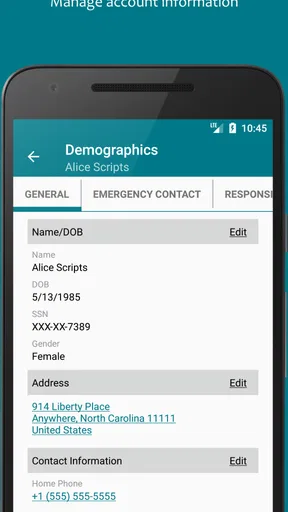
When I first downloaded FollowMyHealth®, setting it up was a breeze. The app is available for both Android and iOS, and once you install it, you’re met with a clean, user-friendly interface. You’ll need to create an account or link it to your existing healthcare provider, which is pretty straightforward. I was impressed by how seamless everything felt right from the start.
In practice, I would treat linking the provider as the important step, not just a setup detail. Before depending on the app for an upcoming visit, sign in and check that you can reach the information you expected. If something seems missing or an account connection does not work, contact the provider’s office or use its usual support route rather than assuming the app is a complete record of your care. Keeping another reliable way to confirm time-sensitive details is sensible, especially during the first few days.
Features That Stand Out
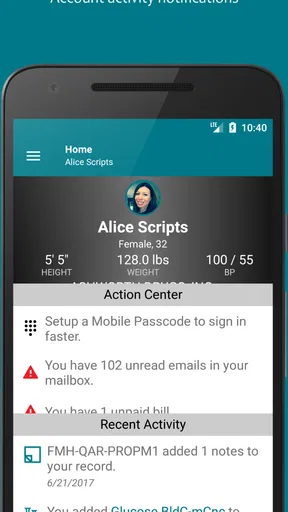
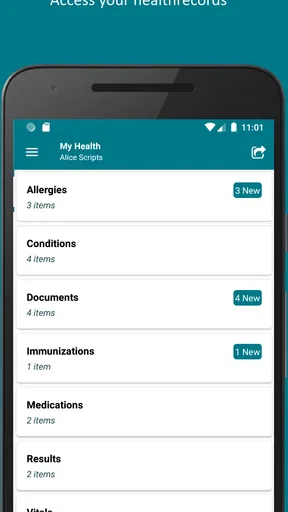
So, what can you actually do with this app? It’s like having your medical records in your hand. You can view your medical history, schedule appointments, and even message your healthcare provider directly. What’s really cool is the ability to track your vitals and medication. I found this particularly useful, especially when juggling multiple prescriptions. Everything is organized and easy to access.
For someone managing several prescriptions, the practical benefit is having medication information and reminders within the same healthcare routine. I would still use the instructions from the clinician or pharmacist as the authority for dose changes and questions about interactions. A reminder can help you remember a plan, but it cannot decide whether that plan should change. That boundary is especially important if a prescription is adjusted, paused, or taken only under specific circumstances.
There’s also a feature for setting up reminders for medication and appointments. I can’t tell you how many times I’ve missed a dose or forgotten about a doctor’s visit, so this is a lifesaver. Plus, the app sends you notifications, which is a nice touch for those of us who need a little nudge now and then.
One useful trade-off to keep in mind is that reminders only help if they fit the way you already manage your day. I’d begin with the appointments and medications that are easiest to overlook, then see whether notifications are noticeable without becoming background noise. If you already rely on a dependable calendar or medication routine, there may be little benefit in duplicating every alert. The goal is a cue you will act on, not a second stream of notifications to ignore.
The Personal Touch
One thing I really appreciated was how personal the experience felt. The app isn’t just about data; it’s about helping you manage your health in a way that suits your lifestyle. You can customize your dashboard to focus on the information that matters most to you. Whether it’s blood pressure readings or upcoming lab results, it’s easy to tailor the experience.
That flexibility is most useful when you know what you need to check often. I would put the details relevant to current care first, rather than trying to make the dashboard display everything equally. For example, someone keeping an eye on readings discussed with a clinician may want those easy to find, while someone preparing for a visit may care more about appointments and recent record details. A dashboard can make information easier to locate, but it does not tell you what a reading means or whether it needs urgent attention.
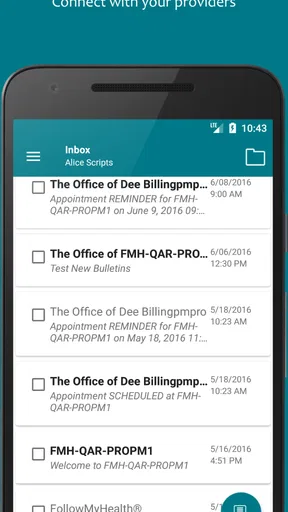
Additionally, the messaging feature with healthcare providers is incredibly convenient. I was able to send a quick question to my doctor and got a prompt response, which saved me a trip to the clinic. It’s these little things that make a big difference.
I would use messaging for clear, non-urgent questions that can be answered without an immediate conversation, such as checking a routine detail or following up on something discussed at a visit. It is not the channel I’d choose for severe, rapidly changing, or urgent symptoms; those call for direct medical help through the appropriate local service. Also, a message is not the same as a live chat, so I would not plan around an instant reply when a decision cannot wait.
Where another option may suit you better
The app’s usefulness is tied to the provider connection, so someone whose clinic does not use it—or whose preferred care team relies on a different portal—may get more consistent results by using that provider’s established option. Switching between portals can be frustrating, but a direct clinic portal may show the information and communication channels that matter for that particular relationship. I would rather use the tool my provider actually supports than maintain an account that rarely reflects my care.
On the other hand, if you mainly want to log personal wellness habits without connecting them to healthcare, a general tracking app may feel simpler and more focused. FollowMyHealth® is not necessarily the best choice for someone seeking a standalone symptom checker, emergency guidance, or a comprehensive personal health journal. It is also a poor fit if you expect every appointment, record, or result from every organization to appear automatically. Confirm what your provider connection offers before changing your routine around it.
Moving to a new portal can also have a practical cost: you may need to learn a different login and workflow, and you should not assume that information in one account will transfer into another. Before abandoning a portal you already use, check which one your provider expects patients to use and keep access to essential instructions and contact details during the transition. If you are comparing options, test the task you care about most—such as locating an appointment or sending a routine question—rather than judging only the home screen.
What to expect from support and access
FollowMyHealth® is free and is rated for Everyone. It was released on August 6, 2012, and its current version is 25.7, with Android 10 as the minimum operating-system requirement. For most readers, the practical takeaway is simply to check that their phone meets the requirement and that they can complete the account and provider-linking steps. The app’s broad availability is helpful, but the actual experience still depends on the connection to the healthcare provider.
If you share a device, take a moment to consider how you protect access to health information and whether notifications could reveal details on a lock screen. I would use the phone’s available security settings and be thoughtful about where alerts appear, especially if other people regularly see the device. That is a general good habit for any medical account, not a reason to avoid the app, and it helps keep convenience from becoming unwanted exposure.
Final Thoughts
Overall, FollowMyHealth® offers a comprehensive way to stay on top of your health. It’s intuitive and packed with features that genuinely contribute to better health management. While no app is perfect, this one comes pretty close if you’re looking to streamline your health information and maintain better communication with your healthcare team.
If you’re someone who likes to have control over your health data and appreciates convenience, give this app a try. It might just become your go-to health companion.
My recommendation is to try it when your provider supports it and you have a clear job for it: keeping up with appointments, reviewing available health information, or making routine communication easier. Give the connection a practical test before depending on it, and keep using your provider’s instructions for medical decisions. If your care already runs smoothly through another portal, or you want a tool focused on general wellness rather than provider-linked records, staying with that alternative may be the more sensible choice.
Pros
- User-friendly interface for easy navigation.
- Comprehensive health record access.
- Integration with various health devices.
- Secure messaging with healthcare providers.
- Appointment scheduling and reminders.
Cons
- Occasional sync issues with devices.
- Limited offline access to records.
- Some features locked without provider support.
- Frequent login required for security.
- Notifications can be overwhelming.
FAQs for FollowMyHealth®
What is FollowMyHealth® and what does it offer?
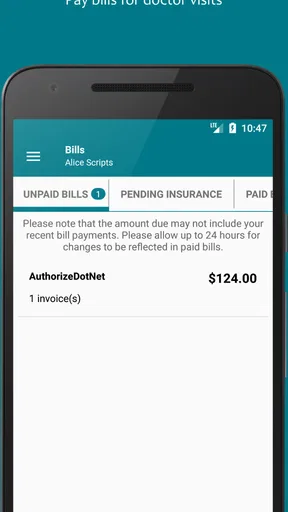
FollowMyHealth® is a comprehensive health management app that allows users to access their personal health information anytime, anywhere. It offers features like appointment scheduling, secure messaging with healthcare providers, viewing test results, and managing prescriptions. This app aims to provide a seamless experience in managing your health records and communications.
Is FollowMyHealth® secure for managing my health information?
Yes, FollowMyHealth® prioritizes user privacy and security by employing encryption and secure login protocols. The app complies with HIPAA regulations to ensure that your personal health information is protected. Users can trust that their data is handled with the utmost care and confidentiality.
Can I connect FollowMyHealth® with my healthcare provider?
Absolutely. FollowMyHealth® allows users to connect with participating healthcare providers. This connection enables seamless communication through secure messaging, easy access to your medical records, and the ability to schedule appointments directly through the app, enhancing your overall healthcare experience.
How user-friendly is FollowMyHealth®?
FollowMyHealth® is designed with user-friendliness in mind. The app features an intuitive interface that is easy to navigate, even for those who may not be tech-savvy. The layout is clean and organized, allowing users to quickly find the information or tools they need with minimal effort.
Does FollowMyHealth® support multiple devices?
Yes, FollowMyHealth® is available on both Android and iOS platforms, ensuring compatibility with a wide range of smartphones and tablets. Additionally, users can access their accounts via a web browser, allowing for flexibility in managing health information across multiple devices seamlessly.


